
Real WordPress cleanup case
Fake Cloudflare CAPTCHA on WordPress? What It Means and How I Cleaned a Real Infection
A small-business WordPress site looked normal most of the time, but some visitors were seeing a fake Cloudflare-style security check. I used direct file access, WordPress review and supporting security tools to find the compromise, remove its persistence and verify the site was clean.
Seeing a fake CAPTCHA, redirect or antivirus warning?
If you did not add it yourself, do not assume it is a browser glitch just because the site looks normal when you check it.
Run the free external WordPress hacked checkerThe warning sign: a fake Cloudflare verification page that did not appear every time
The site owner contacted me after a colleague encountered what looked like a Cloudflare CAPTCHA or human-verification screen while visiting the WordPress site. The confusing part was that the behaviour was intermittent. Other checks could make the site look completely normal.
That pattern matters. A hacked WordPress site does not have to show the same malicious page to every visitor. Malware can selectively load for certain browsers, sessions or traffic sources, which means the person who owns the website may not see the problem at all.
A genuine CAPTCHA is completed inside the browser. If a verification page asks a visitor to open Windows Run, Terminal or PowerShell and paste a command, it is not a legitimate security check.
This is not an isolated WordPress problem
Fake Cloudflare-style CAPTCHA attacks, commonly associated with the ClickFix technique, have been very active. In January 2026, Sekoia reported an IClickFix campaign that had compromised more than 3,800 WordPress sites across 82 countries.
Microsoft also documented another active ClickFix variant in August 2026 that used compromised websites and a fake Cloudflare verification overlay to trick visitors into running malicious PowerShell commands.
Direct file investigation
I did not rely on a WordPress scanner to tell me the site was clean
I first took a full backup, then reviewed the WordPress installation and gained direct access to the website files through the hosting account. That let me check what was actually present on disk rather than relying only on what the WordPress dashboard displayed.
The investigation found a fake plugin masquerading as a legitimate gallery component, a malicious must-use plugin that acted as a persistent backdoor, and three unauthorised administrator accounts. I removed those items and then continued looking for anything left behind.
I compared the WordPress core files against the official WordPress package, reviewed plugins and must-use plugins, checked uploads for executable files, inspected configuration files and looked for unexpected files that did not belong in the installation.
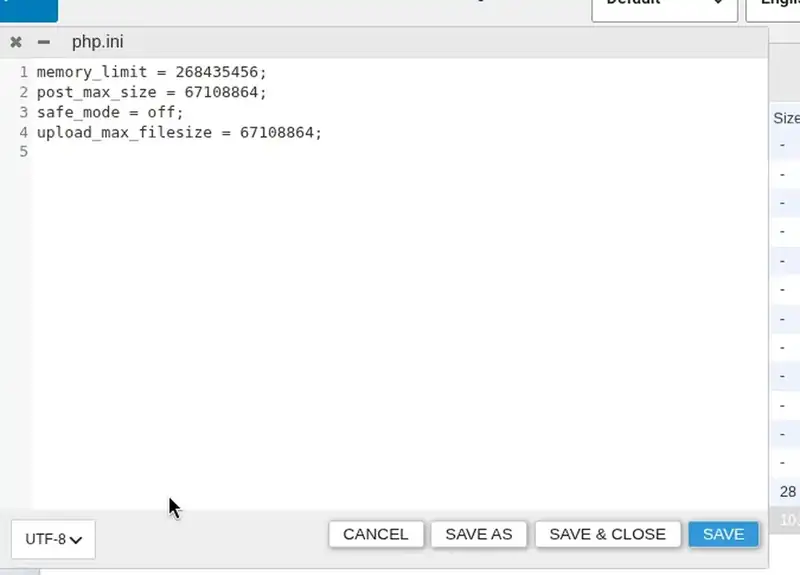
php.ini sitting inside a plugin directory. I treated findings like this as evidence to investigate, not as automatic proof that a file was malicious.Tools help, but they are not the investigation
Where Wordfence helped in this case
I also used Wordfence as a supporting detection and validation tool. It was useful for surfacing unusual files that deserved a closer look and for giving me another view of the site after the manual cleanup.
What I did not do was install Wordfence, press Scan and assume every warning was malware. Security scanners can flag legitimate files, miss conditional behaviour, or show a symptom without explaining the persistence behind it. The value is in interpreting the result alongside the actual filesystem, WordPress users, plugins and configuration.
This is also why a small business does not necessarily need an expensive premium security product to recover from an infection. Free tools can be very useful when combined with careful investigation and direct access to the site files.
The cleanup was followed by a second pass and a clean scan
Removing the obvious fake plugin and backdoor was only the first pass. I then used the file-level review to remove leftover configuration and test files that did not belong, verified that the WordPress core matched the official release, re-audited the administrator accounts and updated security-relevant plugins.
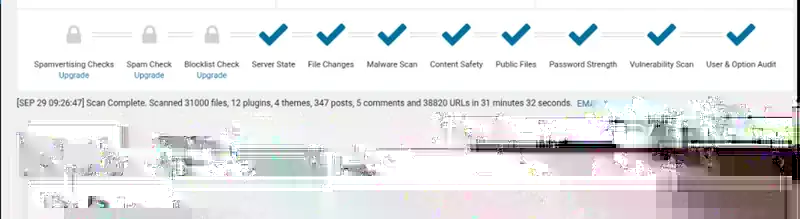
Only after those checks did I run another full Wordfence scan. It examined roughly 31,000 files plus plugins, themes, users and URLs and returned 0 issues. I treated that as supporting evidence for the manual checks already completed, not as the sole proof of cleanup.
Cleaning the malware was only half the job
After the cleanup I hardened the site rather than simply handing it back in the same state. I configured the Wordfence web application firewall with Extended Protection, disabled directory browsing, blocked PHP and similar script execution inside the media uploads folder, and tested the site again afterwards.
The aim was not to add as many security rules or plugins as possible. It was to reduce obvious attack surface without breaking the website.
If the site is already clean and the priority is reducing future risk, see my WordPress hardening service.
What should you do if your WordPress site shows a fake CAPTCHA?
If a customer, colleague or antivirus product reports a fake CAPTCHA, strange redirect or unexpected security page, do not dismiss it because the homepage looks fine on your own device.
Save screenshots and URLs, take a backup before making changes, and avoid randomly deleting files or plugins. The visible page may only be the delivery mechanism; the important part is finding what placed it there and whether anything can recreate it.
If the symptom is a redirect rather than a fake verification page, my WordPress redirect malware guide explains that problem in more detail.
Frequently asked questions
Why is my WordPress site showing a fake Cloudflare CAPTCHA?
If you did not configure it, it can be a sign that malicious code has been injected into the site. ClickFix-style attacks imitate familiar verification pages because visitors are more likely to trust them.
Can my site be hacked even if it looks normal to me?
Yes. Conditional malware can make the site appear normal to the owner while another visitor sees a fake CAPTCHA, redirect or warning.
Is Wordfence enough to clean a hacked WordPress site?
It is useful, but I would not treat one scanner as the whole investigation. In this case I combined it with direct file access, WordPress core integrity checking, user and plugin review, persistence checks and a second validation pass.
Do I need an expensive premium security tool?
Not necessarily. Free tools can provide valuable evidence. The more important part is knowing how to interpret the findings and verifying the installation directly rather than trusting a single green result.